


NurseGrid: Nursing Calendar
4.21.31K Reviews
App Specs
- Version
- Varies with Device
- Updated On
- License
- Free
- Downloads
- 100,000+
- Developer
- HealthStream Inc
- Categories
- Medical
- Platform
- Android
Screenshots
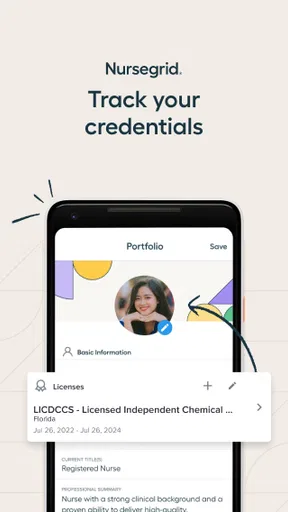
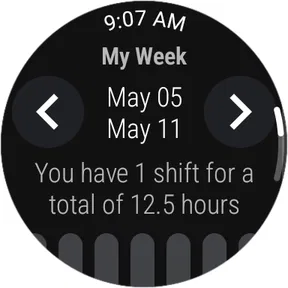
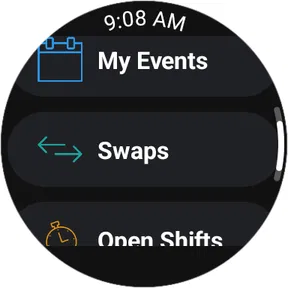
 Analysis by AppCompare
Working in nursing often means managing a schedule that changes faster than a normal calendar can handle. A shift can be swapped, a colleague may need coverage, and a personal appointment still has to fit somewhere between nights, weekends, and long stretches on the floor. NurseGrid is built around that particular problem rather than around general appointment planning. I found it most useful as a nursing-focused calendar for seeing shifts clearly, coordinating with coworkers, and keeping schedule changes from getting lost in messages.
It is a free medical app from HealthStream Inc, available for everyone and compatible with Android versions from 8.0 onward. It has been available since August 13, 2015, and its audience has grown to over 100 thousand installs. The current average sits at 4.2 from around 4.5 thousand ratings, alongside roughly 1.3 thousand written reviews. Those figures suggest a well-established tool with a real user base, although they do not make it automatically right for every hospital or every nurse.
How NurseGrid fits into a real nursing routine
I’d use this section to focus on the small decisions a shift calendar can make easier, not just on recording work hours. A helpful routine is to check the upcoming pattern before agreeing to plans, then leave room for sleep and recovery after nights. That practical distinction leads into the app’s strongest fit: a calendar shaped around nursing schedules rather than general appointments.
A calendar designed around shifts, not ordinary appointments
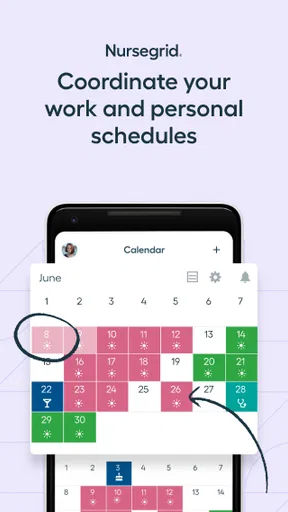
The first thing I noticed is that the app makes more sense when viewed as a work calendar than as a replacement for a full personal planner. A standard calendar can record a shift, but it usually treats a twelve-hour duty period like any other event. A nursing calendar needs to make work patterns easy to scan: days on, days off, nights, weekends, and changes that happen after the original schedule was posted.
That focus gives the app a practical advantage for nurses who regularly think in blocks of time. Instead of opening a general calendar and interpreting several event labels, I can use a layout intended for shift planning. The benefit is not flashy; it is the reduction of small moments of uncertainty. When I am checking whether I can accept an extra shift or arrange something after work, a dedicated view is more natural than a blank monthly grid filled with manually created entries.
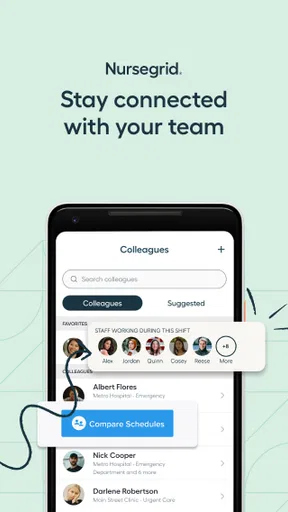
The app also connects scheduling with communication. Its store summary describes shift swapping, networking, and communication, so its purpose goes beyond privately recording when I work. That matters because a schedule is often a shared problem. If one person needs coverage, the useful question is not only “What am I working?” but also “Who might be available, and how can I communicate the change?”
Why shift swapping can be more useful than another calendar reminder
A reminder tells me about an event I already know. A shift-swapping tool addresses the part that usually creates friction: finding a workable alternative and making sure the people involved are talking about the same change. In a realistic situation, I might discover that a family commitment conflicts with an upcoming shift. A regular calendar can show the conflict, but it cannot make the scheduling conversation feel like part of the same workflow.
Worth Reading Before You Choose

EA SPORTS FC Mobile 26 Is a Bigger Football Game, but It Takes Time

Flipboard Shows What News Apps Must Do Beyond the Feed

Switching to Android Auto Means Rethinking Your Driving Routine

Google Calendar Makes a Crowded Week Easier to Manage

Ludo King Makes the Most of the Minutes Between Plans

Baby Panda World Brings Quick Play to Modern Phones, but Its Game Library Feels Busy
That is where this app has a more specific role. I can use the calendar to understand my own pattern, then use its communication-oriented functions to connect with colleagues rather than copying details into several unrelated apps. The important distinction is that this does not make a swap automatically official. I would still treat workplace approval and local scheduling rules as essential. The app can help organize the request; it should not be mistaken for the final authority on staffing.
This is one of the less obvious trade-offs. Bringing coworkers and schedule discussions into one nursing-oriented space can reduce scattered messages, but it also means the app becomes more valuable when the people I work with are participating. If my unit does not use it, the networking and swapping side may be much less useful than the personal calendar.
The value of a free app
There is no purchase decision to calculate here: the app is free to use. That makes the initial test straightforward. A nurse can see whether the calendar fits an actual work pattern without committing money to a subscription or buying a premium planning tool first. From a value perspective, that is its clearest strength. The cost barrier is low, while the time saved by keeping shifts in a dedicated place can still be meaningful.
Free access does not mean every user receives the same practical value. The real return depends on whether the app matches the way a unit handles schedules. A nurse who only works a stable pattern and already has an effective calendar may gain little. Someone who frequently changes shifts, coordinates with several colleagues, or needs a clearer way to view irregular work may gain much more without paying for another service.
I also appreciate that the free price changes the standard for judging it. I do not expect it to replace every function of a hospital scheduling system, a personal calendar, and a messaging platform at once. I judge it instead by whether it makes nursing schedules easier to understand and discuss. On that narrower question, it offers a sensible reason to try it.
Where it can make an ordinary day easier
Imagine finishing a run of shifts and realizing that an appointment falls on a day that looked free until a schedule adjustment was made. With a general calendar, I might need to edit an event, send separate messages, and search through conversations to see whether a replacement was found. A dedicated nursing calendar gives me a more direct place to review the work pattern and begin the conversation.
Another useful scenario is planning recovery time around nights. A normal calendar can display the dates, but it does not naturally encourage me to think about the transition between a night shift and the following day. A shift-focused view makes the work sequence more visible. I can then avoid casually booking something early after a demanding run, even if the date technically appears open.
For nurses who pick up occasional work, the app can also serve as a quick visual check before agreeing to anything. I would first inspect the existing pattern, then consider travel, rest, and personal obligations rather than accepting a shift based only on one apparently empty date. That is a small workflow change, but it is more useful than simply having another place to type an event.
Useful habits that improve the experience
My first recommendation is to enter or review the schedule before using the social side of the app. If the calendar is incomplete, a potential swap conversation starts from unreliable information. A few minutes spent checking dates and shift details is more valuable than immediately trying to coordinate with other people.
Second, I would use the app as the working view for shifts while keeping important personal commitments visible in whatever broader calendar I already trust. That division avoids forcing one tool to do everything. NurseGrid is strongest when it answers “What does my nursing schedule look like?” A general calendar may still be better for birthdays, travel, bills, and appointments shared with family.
Third, I would confirm any agreed change through the official process used by the workplace. A message or swap discussion can show that people have communicated, but staffing decisions often involve rules that an independent app cannot replace. This is not a flaw unique to this product; it is a boundary worth remembering whenever a third-party app is used around employment scheduling.
Finally, I would avoid treating availability as a simple yes-or-no label. A day without a listed shift may still be needed for sleep after nights, commuting, childcare, or study. The app helps expose the schedule, but good decisions still require context. Its best use is as a clear starting point for planning, not as an automatic judgment about whether someone should accept work.
Communication and networking: helpful, but dependent on participation
The communication angle is more valuable in a connected nursing environment. If colleagues are present and willing to communicate through the app, it can make schedule-related conversations more focused than a long group chat. A conversation about coverage is easier to follow when it stays tied to the relevant nursing schedule rather than being mixed with unrelated messages.
However, this is also where expectations should stay realistic. An app cannot create a responsive network in a unit where nobody uses it. A nurse may install it hoping to discover immediate swap opportunities, only to find that the local community is small or inactive. That does not necessarily mean the calendar itself is poor; it means the social value depends on adoption beyond one phone.
I would therefore ask coworkers or a manager whether the app is already part of the unit’s routine before relying on its networking features. If the answer is no, I would still consider it for personal shift organization, but I would not choose it solely for peer communication. In that situation, the app’s value comes from the calendar rather than from the network.
How it compares with the usual alternatives
The most obvious alternative is a built-in phone calendar. That option is familiar, flexible, and already connected to personal appointments. It is probably better for someone who works a predictable schedule and wants one universal calendar. NurseGrid becomes more compelling when the main problem is the shape of nursing work: rotating shifts, coverage discussions, and the need to see work patterns quickly.
A paper planner is another realistic alternative. Some nurses prefer writing shifts down because it is fast, private, and easy to annotate. Paper can also be excellent for adding notes about sleep, commute, or personal priorities. The weakness is that a paper schedule does not naturally support digital communication or quick changes shared with colleagues. If swaps happen often, a dedicated app is more convenient; if personal reflection and handwritten notes matter most, paper may remain the better companion.
Workplace scheduling software can be more authoritative because it may reflect the official roster. That is the better choice for confirming what management has approved. NurseGrid should be viewed as a practical layer for organizing and discussing shifts, not automatically as the source of truth for employment records. A nurse who needs payroll, leave balances, compliance information, or formal approval should prioritize the employer’s system.
Messaging apps can handle quick conversations, but they are poor long-term calendars. Details disappear into chat history, and it is easy to miss which version of a schedule is current. NurseGrid’s advantage is that communication is tied more closely to the scheduling problem. Its disadvantage is that it may not offer the broad reach or universal familiarity of a messaging service.
Limitations I would consider before relying on it
The first limitation is dependence on participation. The more I want from shift swapping and networking, the more I need colleagues to use the same service. A solo installation can still provide a useful calendar, but it cannot reproduce the full value of a shared scheduling community by itself.
The second is that a dedicated shift calendar can become another place to maintain. If my hospital already publishes changes through an official system, I may have to keep both views aligned. That duplication creates a risk: the app is helpful only when I remember to update it after a change. I would not rely on it blindly after a last-minute phone call, manager message, or posted roster adjustment.
The third is scope. This is a medical-category app for nursing schedules, not a complete personal productivity suite. Someone looking for detailed task management, household planning, clinical documentation, or a formal workforce-management platform may find the focus too narrow. That narrowness is also its reason for existing, so I see it as a trade-off rather than a defect.
There is also a human factor. Nurses often work under pressure, and a scheduling tool has to be quick to understand. If entering shifts or checking changes feels like administrative work, the app may not remain part of the routine. I would judge it after using it through a full cycle of ordinary shifts, a change, and a personal conflict rather than after one brief glance.
Who is most likely to get real value
I would recommend trying it first if you work rotating shifts, regularly trade coverage, or need a clearer view of nights and days off. It is also a good candidate for nurses who feel that their current calendar is technically functional but visually poor for shift patterns. The free price makes that trial relatively easy, and the established install base indicates that it is not an obscure experiment.
It may also help nurses who coordinate with a familiar group of colleagues. In that setting, the communication and networking functions have a practical chance to become part of everyday scheduling rather than remaining unused extras. The strongest case is a unit where people already want a shared way to discuss changes.
I would be less enthusiastic for someone with a fixed Monday-to-Friday schedule, no need to swap shifts, and a well-organized personal calendar. That person may be adding another app without solving a real problem. I would also hesitate if the workplace requires all schedule changes to happen in a specific official system and colleagues are not interested in another communication channel.
New nurses may find the visual organization useful while learning how their schedule affects sleep, errands, and recovery. Experienced nurses may appreciate the faster overview if they manage several commitments around irregular work. In both cases, the app works best when it supports a deliberate routine instead of becoming the only place where important scheduling information exists.
My verdict on trying it
After looking at what it is meant to do, I see NurseGrid as a focused free tool rather than a universal calendar replacement. Its strongest value is the combination of a nursing-specific schedule view with ways to communicate about shifts and swaps. That combination is more relevant to clinical workers than a generic event calendar, especially when work patterns change frequently.
The trade-off is equally clear: its shared features depend on coworkers, and its schedule should not replace official workplace confirmation. I would use it to organize my view, spot conflicts earlier, and start conversations, while continuing to verify approved changes through the proper channel. That approach captures the convenience without giving a third-party calendar more authority than it deserves.
My recommendation is to try it if irregular nursing shifts are the problem you are actively trying to solve. Because access is free, the decision is mainly about fit and habit rather than purchase value. If your current system already handles shifts cleanly and your colleagues are not using this one, skip it. If you regularly juggle nights, coverage, and changing availability, this app has a specific purpose and a reasonable chance of making that part of life less scattered.
For me, that focused purpose is enough to make it worth testing. I would not install it expecting a complete hospital scheduling platform or a replacement for every personal planning tool. I would install it as a dedicated nursing calendar, give it a realistic trial during changing shifts, and keep it only if the clearer overview and easier coordination genuinely save effort.
Pros
- Quickly organizes shifts
- availability
- and work commitments in one calendar.
- Shift details can be shared with coworkers to simplify scheduling coordination.
- Useful reminders help reduce the chance of missing upcoming shifts.
- Designed specifically for nursing workflows and common scheduling needs.
- Clean interface makes recurring shift patterns easy to review at a glance.
Cons
- Some features may require an account or access to supported workplace tools.
- The app may feel unnecessary for nurses with simple or fixed schedules.
- Notifications can become excessive if several reminders are enabled.
- Calendar accuracy depends on users entering schedule changes promptly.
- Availability and workplace features may vary by region or employer.
FAQs for NurseGrid: Nursing Calendar
What is NurseGrid: Nursing Calendar used for?
NurseGrid: Nursing Calendar is designed to help nurses organize and manage their work schedules in one place. You can add shifts, review upcoming assignments, track availability, and keep personal plans separate from work commitments. It is particularly useful for nurses working rotating schedules, multiple shift types, or changing assignments who want a clearer view of their time.
Can NurseGrid automatically import my hospital or clinic schedule?
The app may support schedule sharing or importing depending on your workplace and the features available in your region, but it should not be assumed that every hospital system connects directly to NurseGrid. In many cases, users still need to enter shifts manually or confirm imported information. Always compare the app’s calendar with your official schedule to avoid relying on outdated or incomplete details.
Can I share my schedule with coworkers using NurseGrid?
Yes, NurseGrid is built around making shift coordination easier for nursing teams. Depending on the current version and workplace setup, you may be able to connect with coworkers, compare schedules, and see who is working particular shifts. Sharing features can simplify shift planning, but you should review privacy settings carefully and only share scheduling information with people you trust.
Does NurseGrid include shift-swapping or scheduling tools?
NurseGrid can help users coordinate shifts and communicate availability, making it easier to identify potential coverage or schedule conflicts. However, using the app does not automatically approve a shift exchange or change your official work assignment. Any swap should still follow your employer’s policies and receive confirmation from the appropriate manager or scheduling department.
Is NurseGrid: Nursing Calendar free to download and use?
NurseGrid may be available to download without an upfront charge, but some features, services, or workplace-related tools can depend on the app’s current subscription model or regional availability. Before downloading, check the Google Play Store or Apple App Store listing for pricing, in-app purchases, supported devices, and updated terms. This is especially important if you need advanced scheduling or team features.


